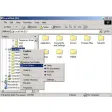
Fast Folder Access is the fastest way you can access your files in the Windows Explorer.
The program can function completely and accurately without even being run each time. It can operate as the part of your context menu in your Windows Explorer. All you need to do is to right-click on your Explorer and the Fast Folder option is displayed. You can add all the files and folders you need to access to this list and they are available to you instantly. You can access all folders in open/save dialog boxes as well as Windows Explorer with ease. You can also use it to view the details about an image file as well as preview it by right-clicking it in the Explorer Window. Files on the desktop and on the Start button can also be included in the list of fast access folders.
It obviously will prove itself to be the fastest way to access your data without ever needing to remember long paths and addresses of your data files.
























User reviews about Fast Folder Access
Have you tried Fast Folder Access? Be the first to leave your opinion!